5 Things That Happen When You Delete an App
Lilla Odin
April 28, 2026
Deleting an app feels simple. You tap and hold the icon, press remove, and within seconds, it disappears from your screen. But what actually happens behind the scenes when you uninstall an app from your phone, tablet, or computer?
While the process looks straightforward, several technical and practical changes take place. Understanding what really happens can help you manage storage, protect your data, and avoid surprises later.
Here are five things that happen when you delete an app.
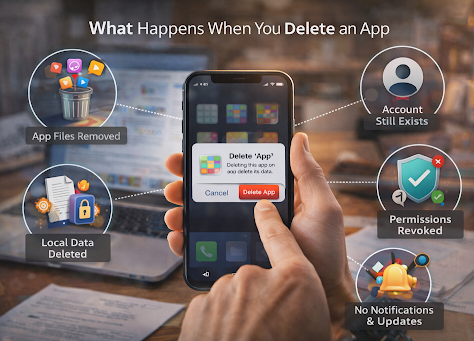
The App Files Are Removed from Your Device
The most immediate effect of deleting an app is that its main program files are removed from your device’s storage. These files include the code that makes the app function, its built-in resources, and any temporary cached data stored locally.
This is why uninstalling large apps can instantly free up significant space. Games, editing tools, and streaming platforms often store substantial data on your device. Removing them can improve performance, especially if your storage was nearly full.
However, not all associated data may disappear completely, depending on your operating system and settings.
Local Data May Be Deleted
When you uninstall an app, most locally stored user data is removed as well. This can include saved preferences, login sessions, downloaded files within the app, and offline content.
For example, if you delete a note-taking app without syncing your notes to the cloud, those notes may be permanently erased. Similarly, offline playlists or downloaded videos are typically removed.
That said, many modern apps store user data in cloud servers. If your account is synced online, your information may still exist even after the app is removed from your device.
Your Account Usually Still Exists
Deleting an app does not automatically delete your account. This is one of the most common misconceptions.
When you uninstall a social media app, streaming service, or online shopping platform, your profile and data remain on the company’s servers unless you specifically request account deletion. If you reinstall the app later and log back in, your account will usually appear exactly as you left it.
To fully remove your presence from a platform, you typically need to go through the account deletion process inside the app or through the company’s website.
Background Permissions Are Revoked
Apps often request access to features such as your camera, microphone, contacts, location, or notifications. When you delete the app, those permissions are automatically revoked.
This means the app can no longer collect data or run processes in the background on your device. Any background services tied directly to the app are stopped.
However, if the app was linked to other services or accounts, certain integrations may remain active until manually disconnected.
You Stop Receiving Notifications and Updates
Once the app is deleted, it can no longer send push notifications to your device. You will stop receiving alerts, reminders, promotional messages, or updates from that application.
Additionally, the app will no longer receive software updates on your device. This is obvious, but important. Updates often include security patches and new features. If you later reinstall the app, you will download the most recent version available at that time.
Deleting an app can therefore reduce distractions and limit digital clutter, especially if notifications were overwhelming.
A Simple Action with Bigger Effects
Deleting an app may feel minor, but it can impact storage, data access, privacy, and digital organization. While the app itself disappears quickly, your account data often remains stored online unless you take additional steps.
Before uninstalling, it is wise to confirm whether important information is backed up. If your goal is to permanently remove your presence, look for account deletion options rather than relying solely on uninstalling.
In today’s app-driven world, understanding what happens behind the scenes helps you make smarter decisions about your digital footprint. Sometimes, removing an app is not just about freeing space. It is about regaining control over your time, privacy, and device performance.